See your whole system as it really is.

Afunana brings every program, every rule and all your data into one picture, checked against the code and kept current as it changes. Everyone who works on the system, and every AI tool they use, starts from the same understanding. Documentation, development and modernization all come out of it.

The peace of mind to keep it running, the confidence to change it, and room to prepare for what comes next. Use it on its own, or with the tools you already have.

On-prem, air-gapped, with your own AI connections and models.

IBM iIBM ZOracleNaturalSAP

Application overview

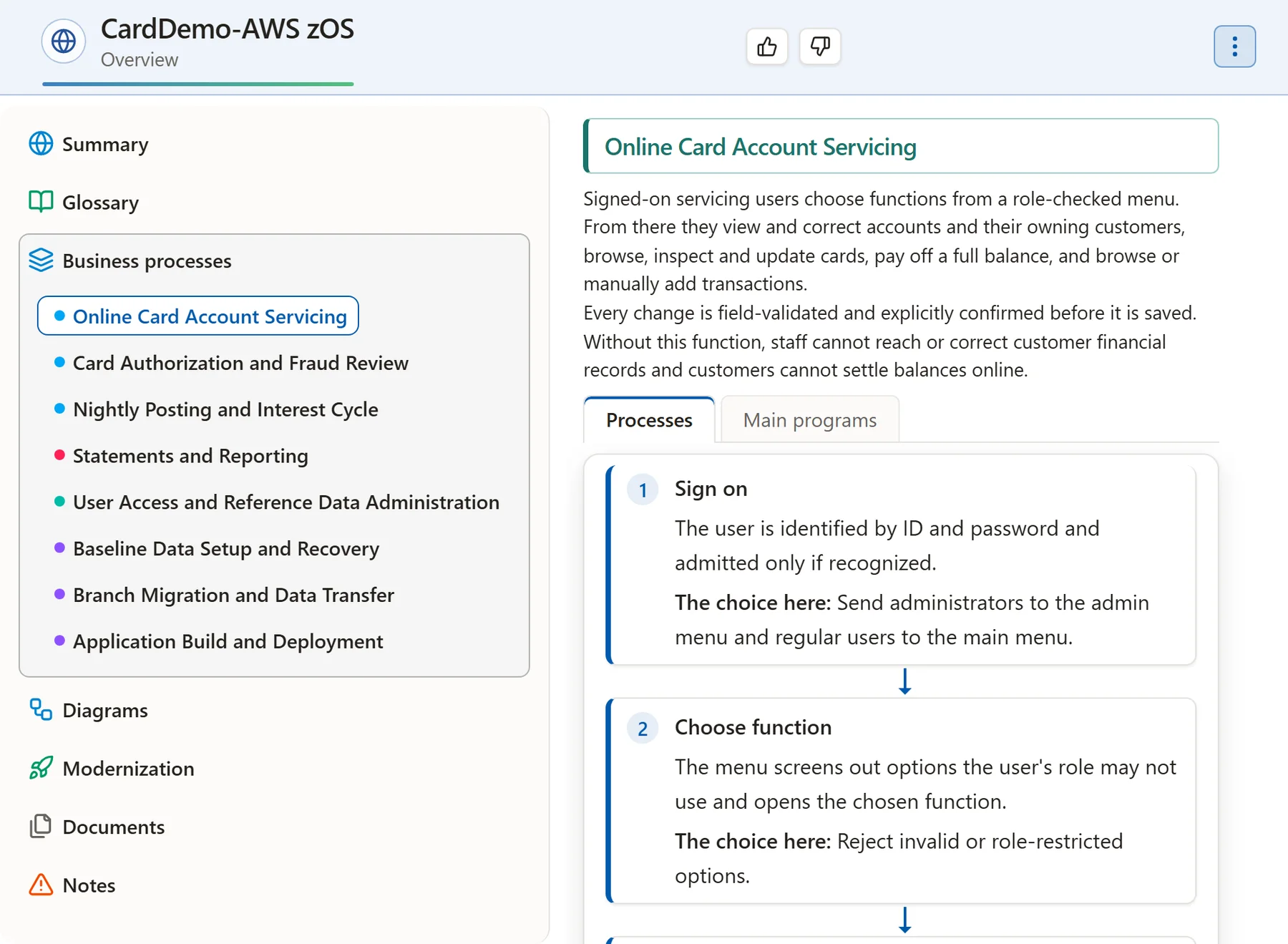
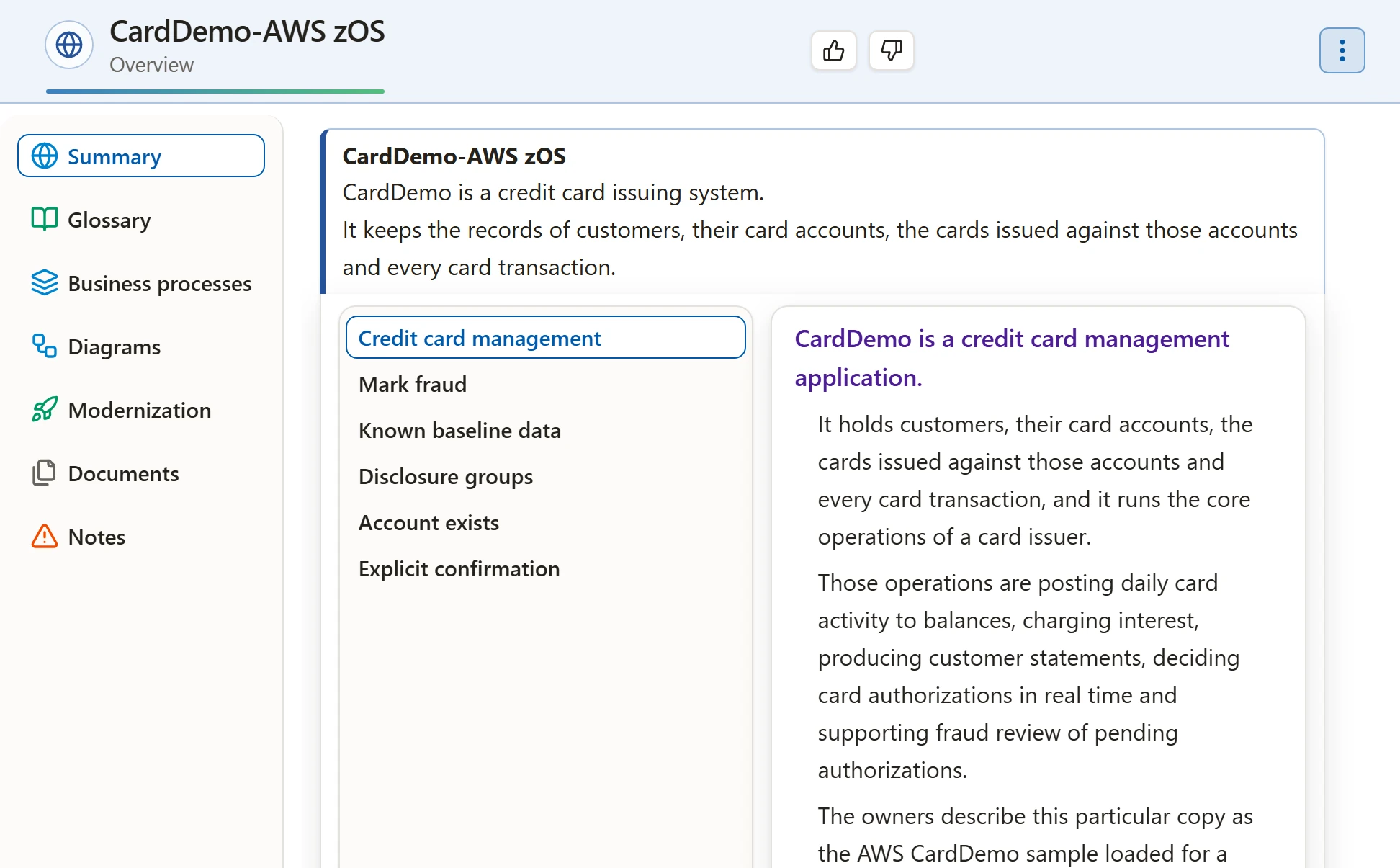
The application overview starts with what the application does for the business, in short sections you pick from the menu beside it.
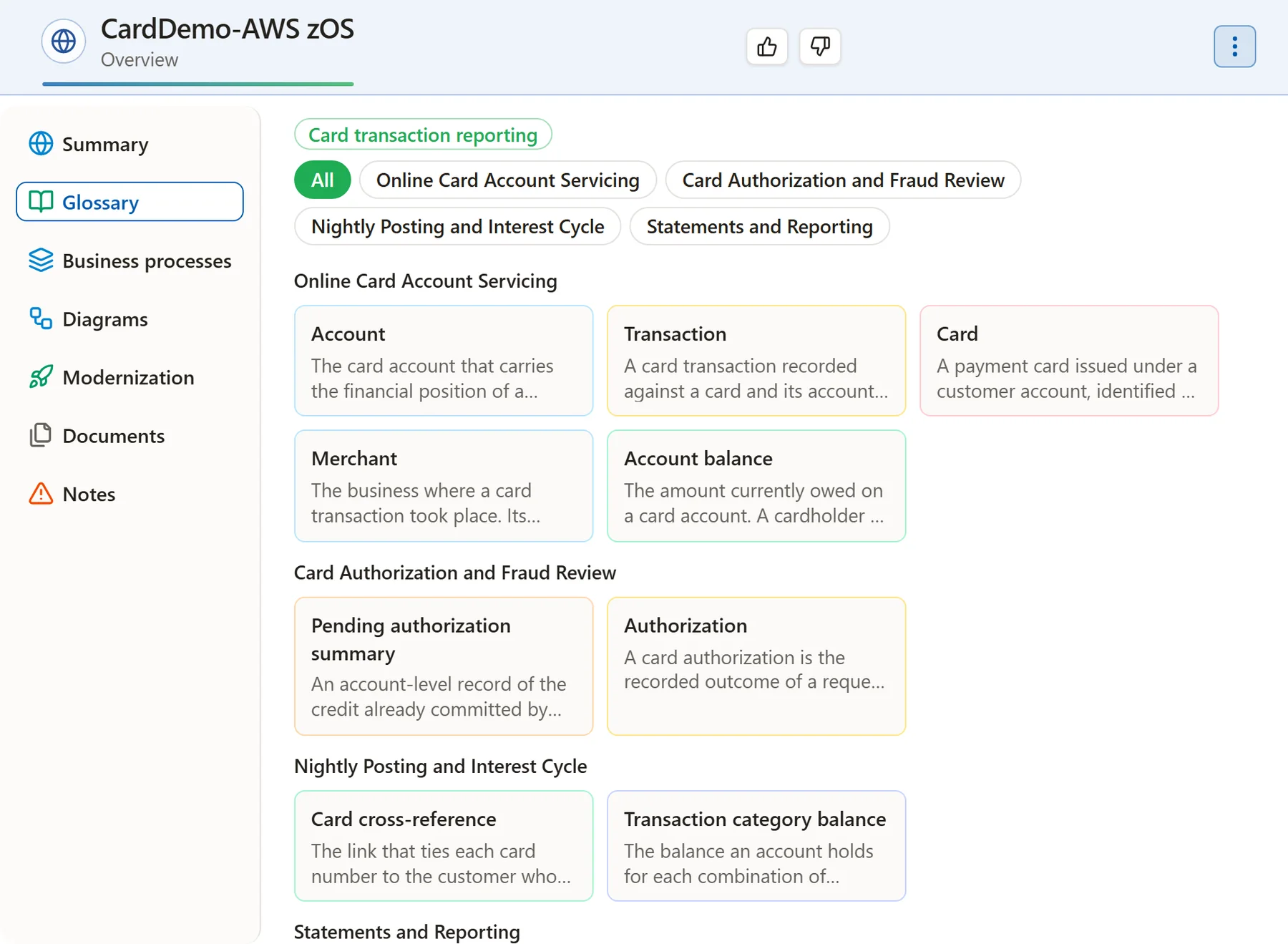
The AWS CardDemo overview in Afunana: its purpose in short pieces, each named in the menu beside it.

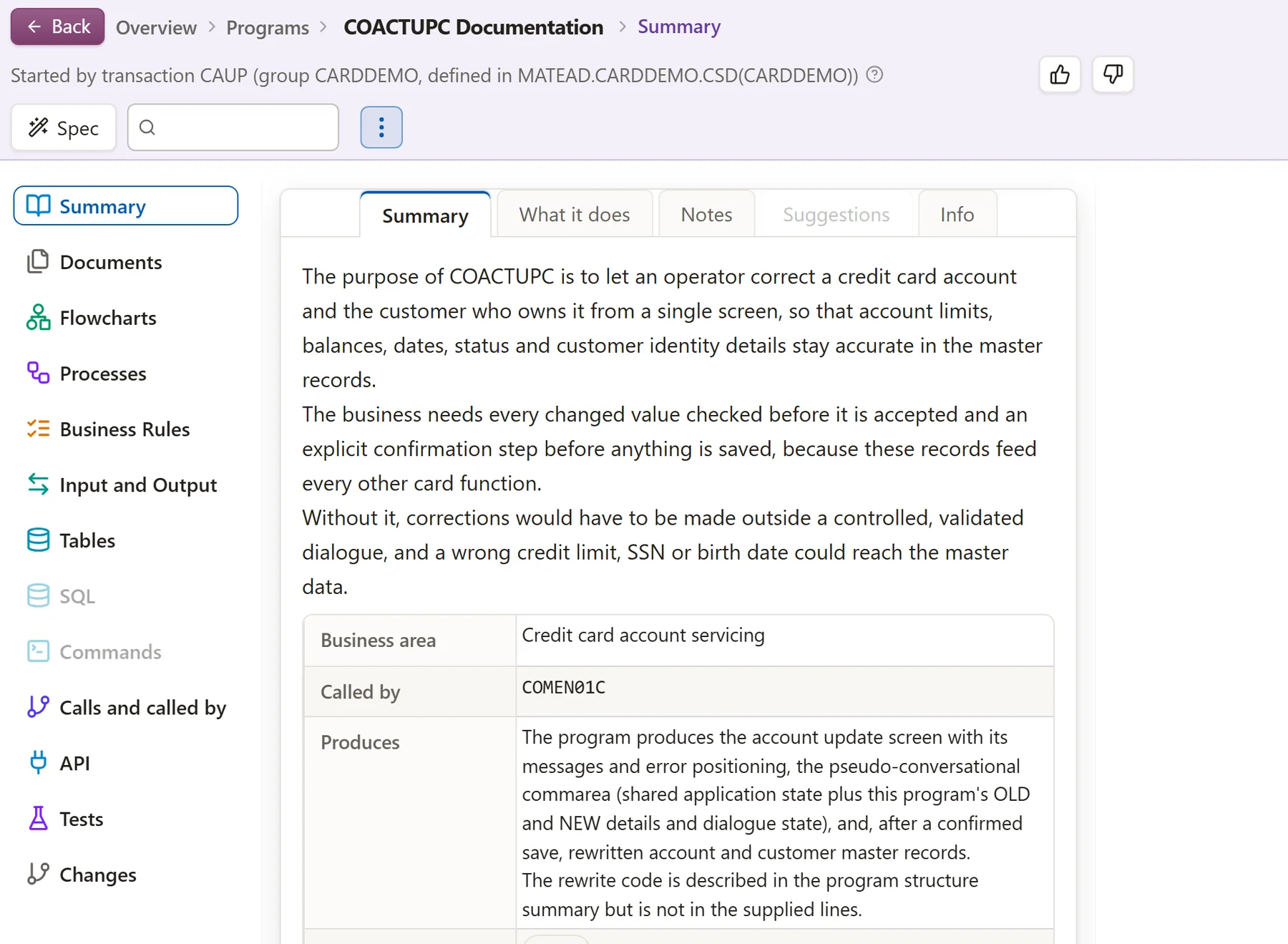
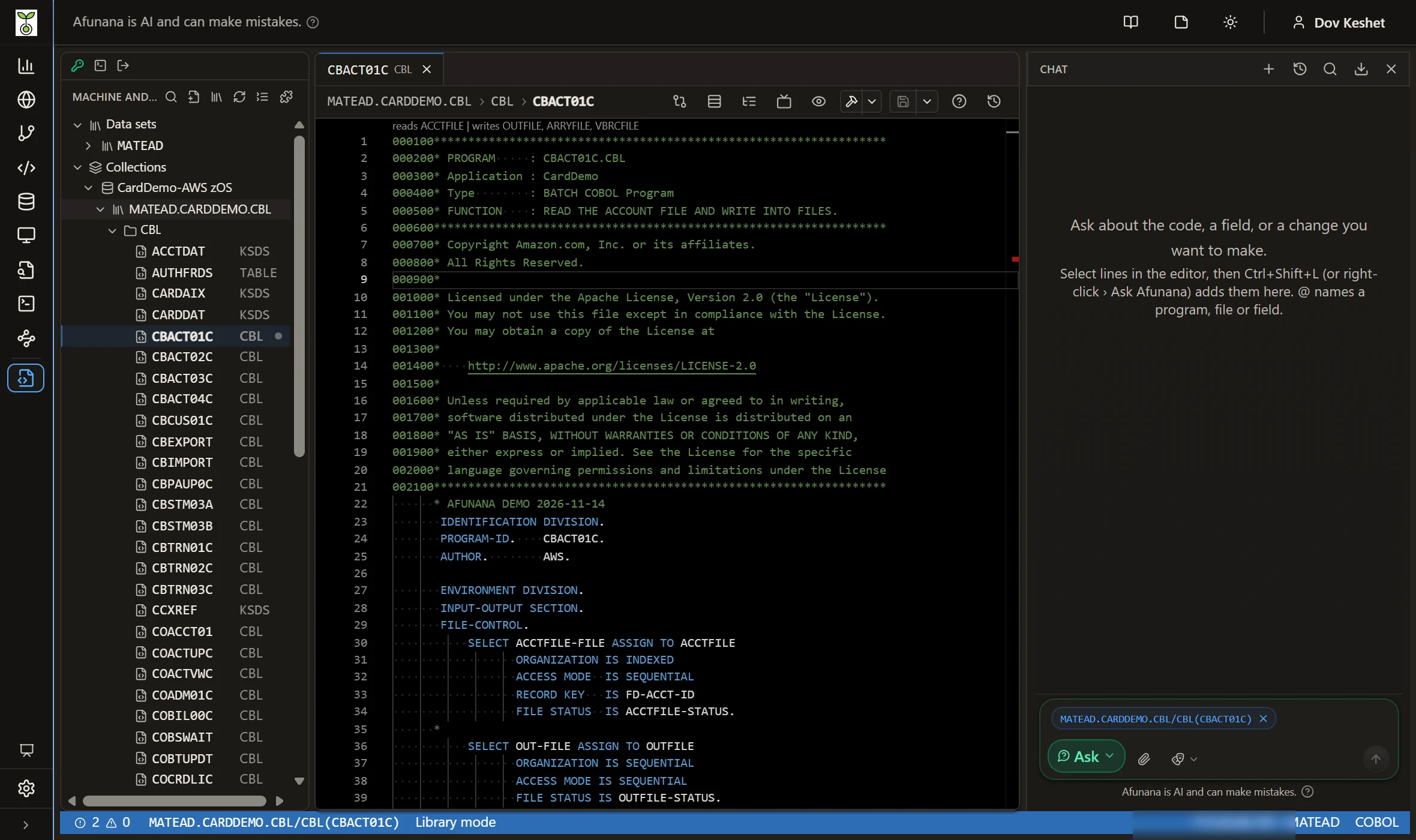
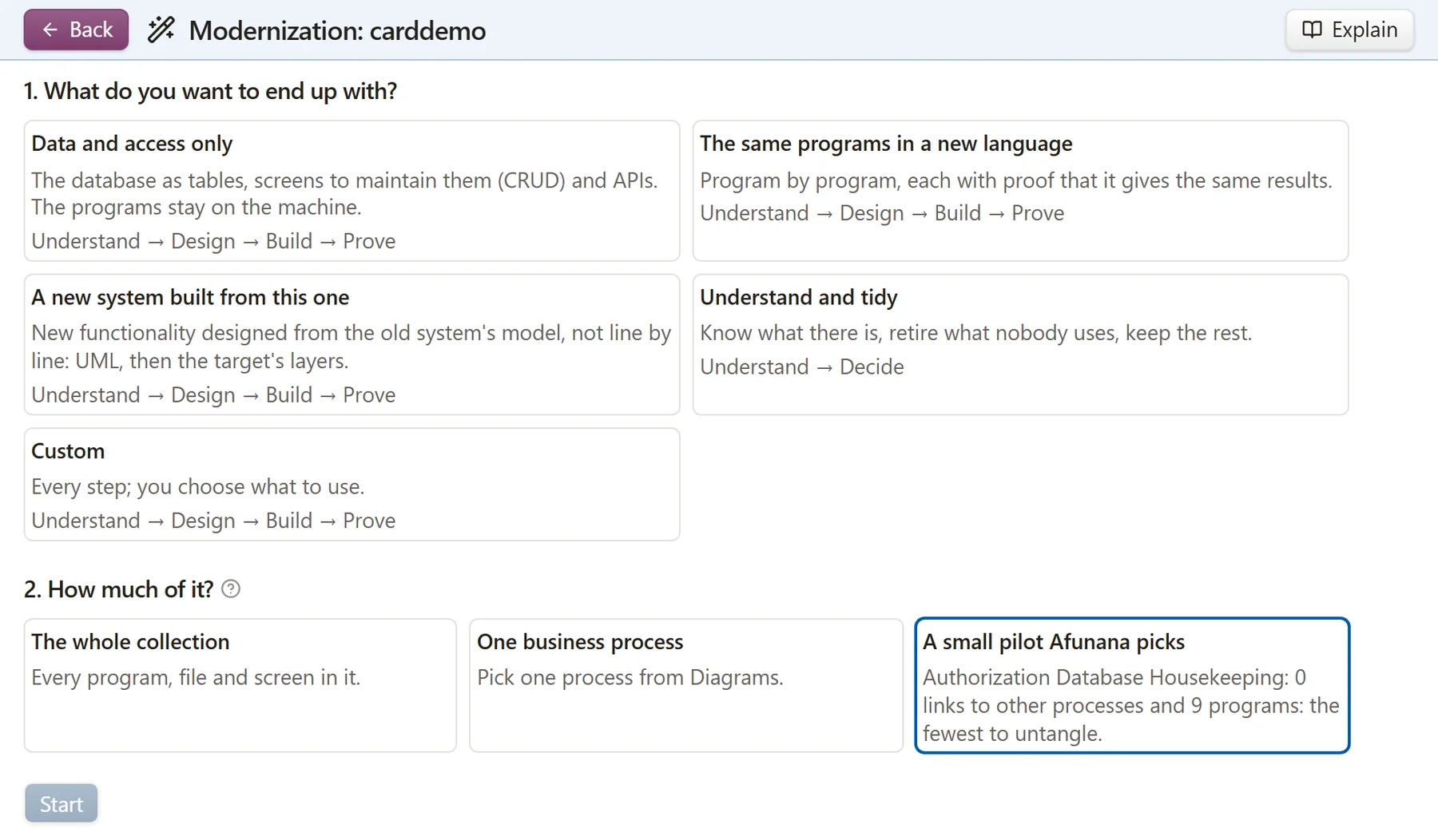
The screenshots on this site show AWS CardDemo, a public sample application, read from a mainframe. They hold no customer data.

How it works

One model of the system, built from the top down

Shared by all three parts

  1. Your systemYour programs, files and data, where they are today.
  2. ReadAfunana reads the source code, the file and field definitions, the data, and how often each program runs.
  3. The system modelAfunana maps the business concepts to the files and fields that hold them, and works out the processes, the rules, what each program calls, which data it uses, and how the files connect.

1. Documentation

  1. Documents, diagrams and chatThe AI writes the documents and diagrams from the model, and your specialists correct them.

2. Develop and maintain

  1. Afunana DeveloperBefore a change is made, the programmer sees everything it affects, and the change goes for review with its proof.

3. Modernization

  1. One part at a timeEach part is understood, generated or rewritten, and proven to give the same results as the old system.
Always currentWhen the code changes, Afunana updates the documentation of what changed and of everything that depends on it.

Why organizations need it

Close to the truth, for everyone who works on it

In most organizations, only a few people know how a legacy application really works, and the documents written years ago no longer match the code. Afunana learns what the whole application does, once: what calls what, which data, which rules. It keeps that current, and shares it with everyone, and with every AI tool they use. Answers they can check, changes they can trust, and knowledge that stays when people leave.

  • The AI starts from the whole application

    Afunana reads each program once and keeps what it learned, so every question, whether it comes from Afunana's chat or from the AI assistants your programmers already use, is answered from the whole application, with the source lines behind it.

  • Answers and corrections are shared

    Two people who ask the same question get the same answer, based on the same lines of code. When a specialist corrects something, the correction is kept for everyone, and what people find out stays in the documentation after they leave instead of ending with their chat.

  • Every change is prepared the same way

    Every programmer sees the same impact for a change and gets the same plan, rather than each person judging it alone. Code the AI writes follows the style of your own programs, whichever assistant writes it.

1. Documentation

Documentation you can check against the code

Peace of mind: you know what you have, every rule and every line, even after the people who wrote it have gone.

  • Afunana reads the system directly

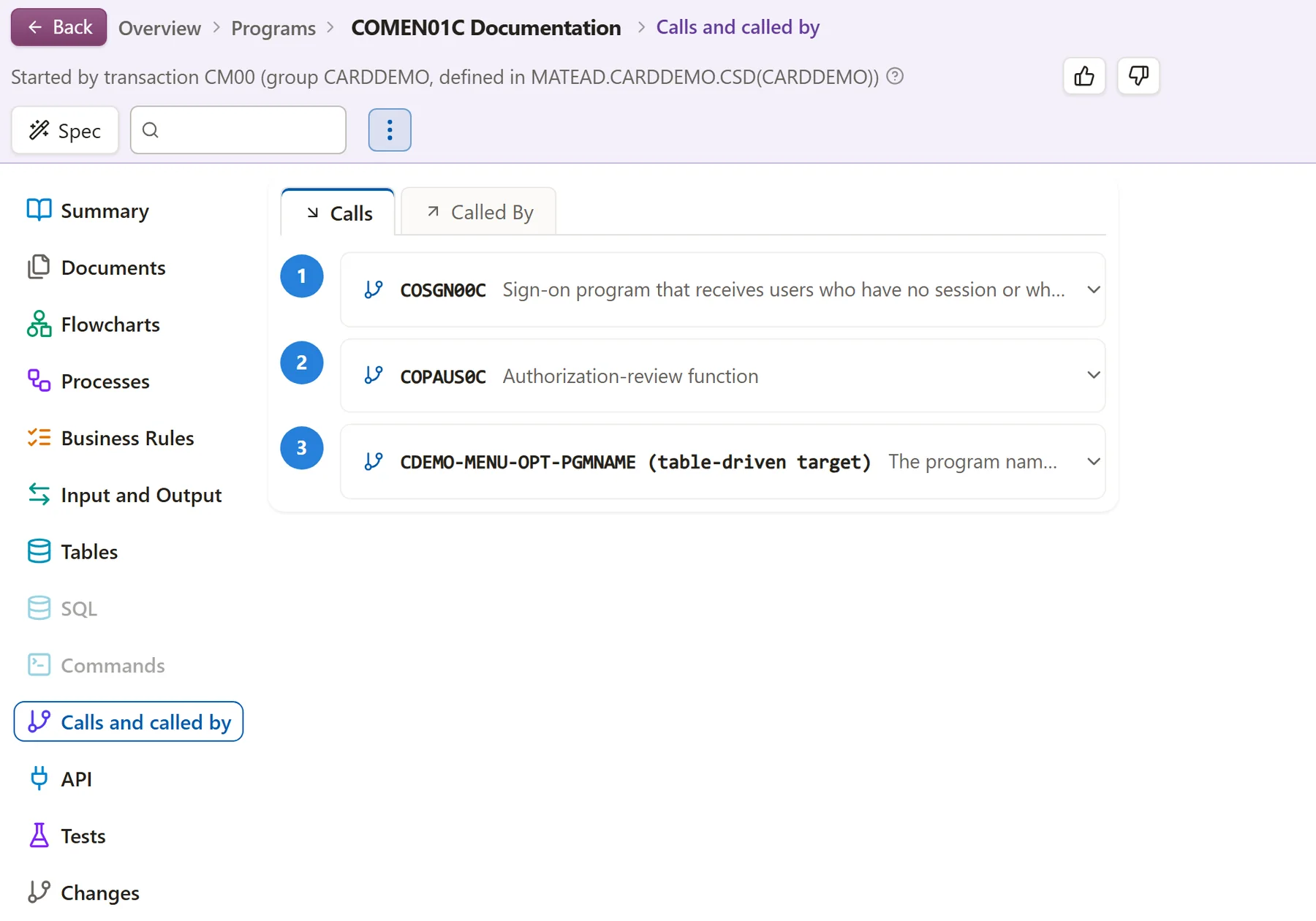
    Afunana reads the source, the file and field definitions, the scheduled jobs and how often each program runs, using a user account you choose. It finds every program that each program calls, even when the called program's name is held in a variable or a menu table, and checks that the parameters passed match what the called program expects.

  • Search across all your applications

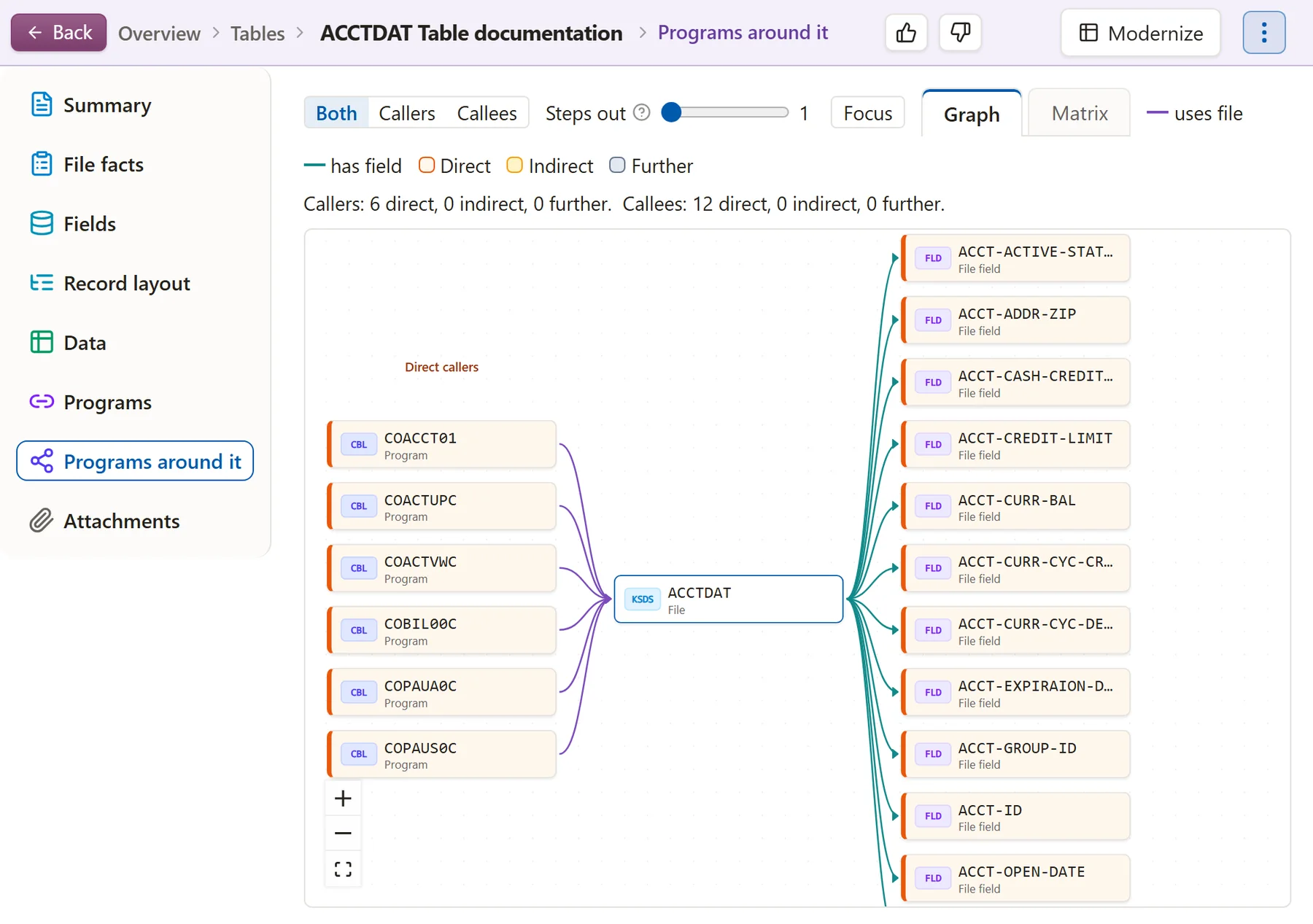
    One search finds any program, file, field, shared piece of code, status code or document across every application you have access to. Each result shows the lines where the name appears, and what calls it and what it uses, level by level.

  • Map your data in business terms

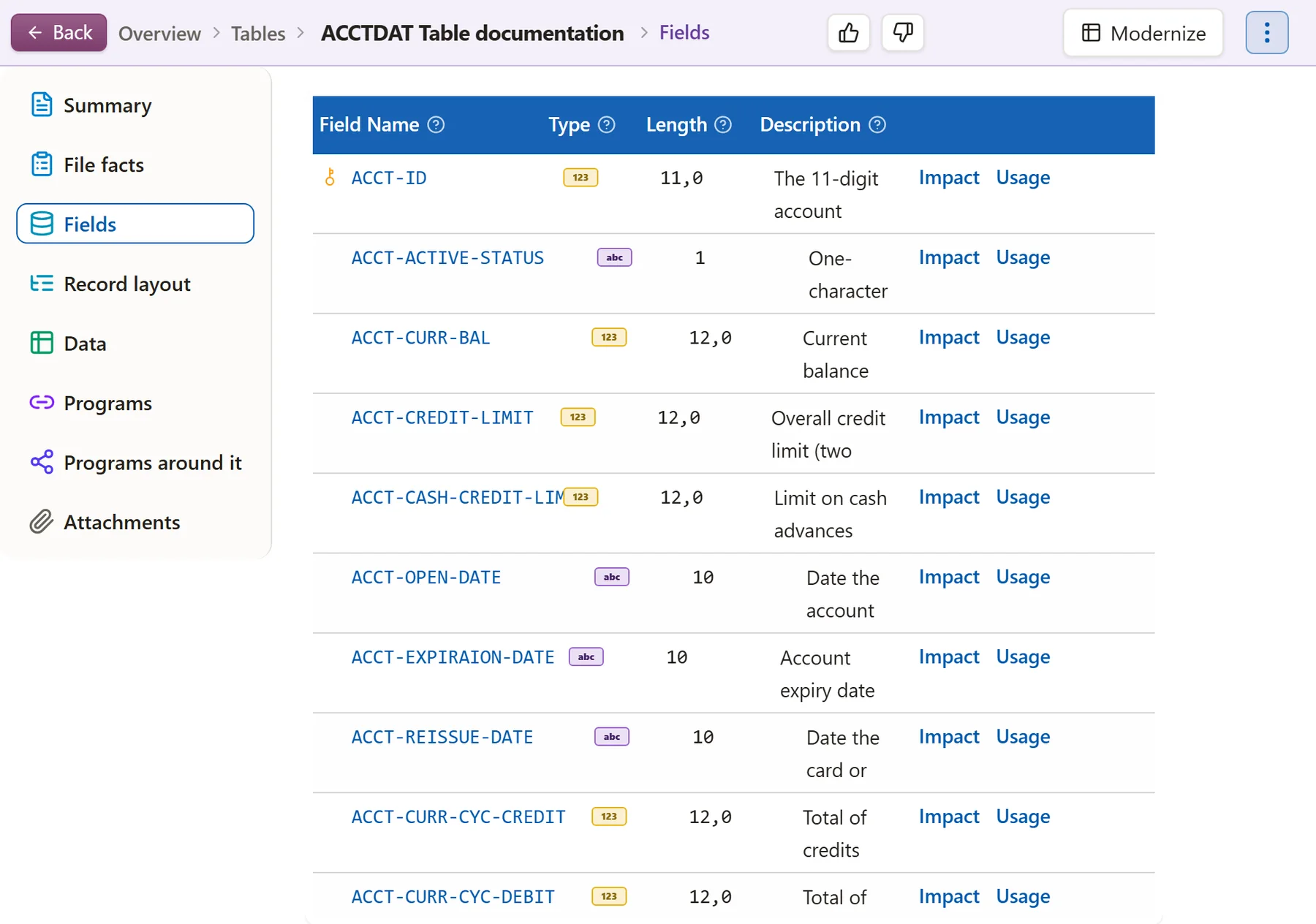
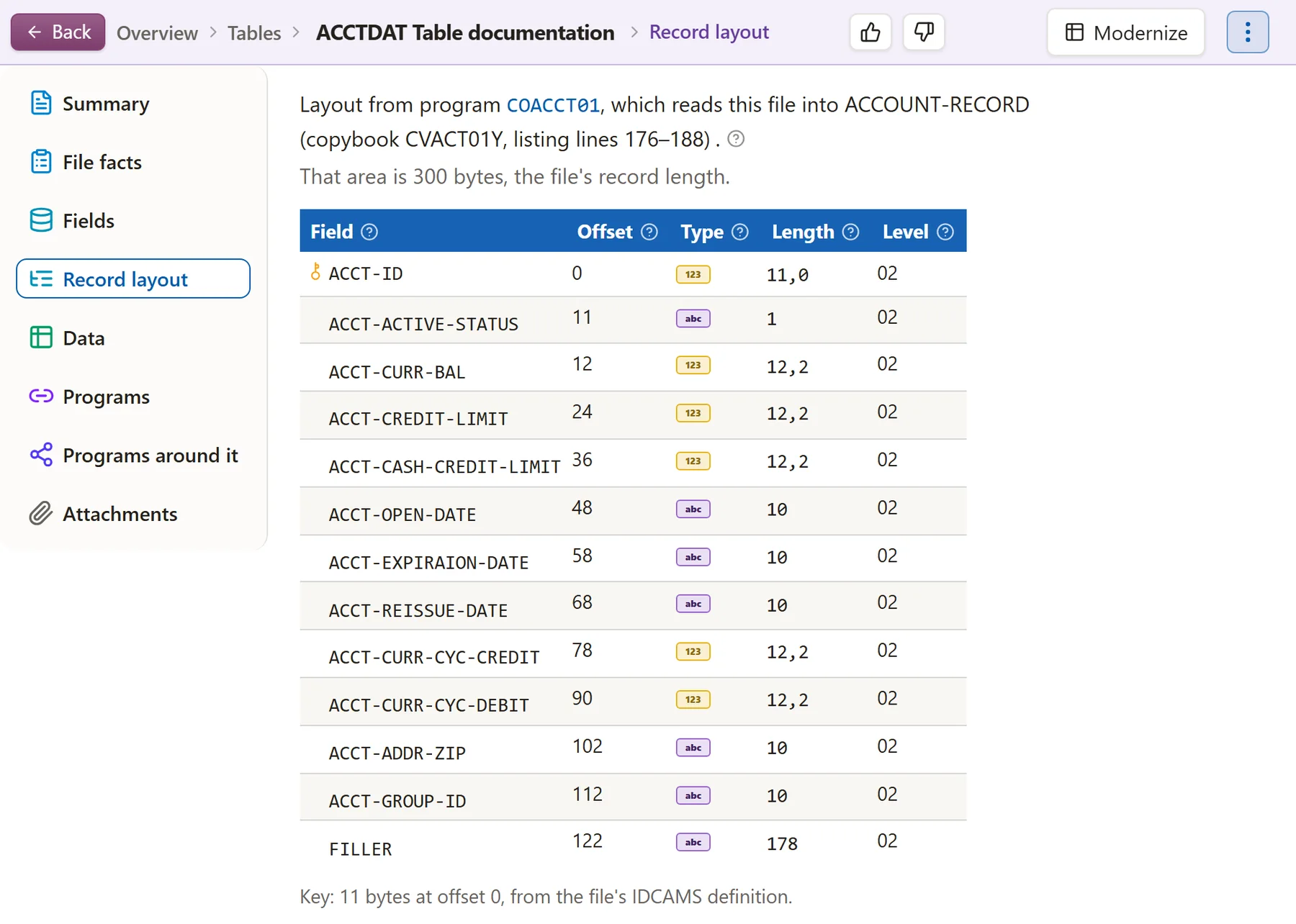
    The data map names the business concepts, such as an account or a customer, and the files and fields that hold each one. How the files connect is learned from the programs that read them together, and can be tested on the live data. The data map can be exported in a standard format, so analytics and data science tools see your data in business terms.

  • Every sentence points to the code behind it

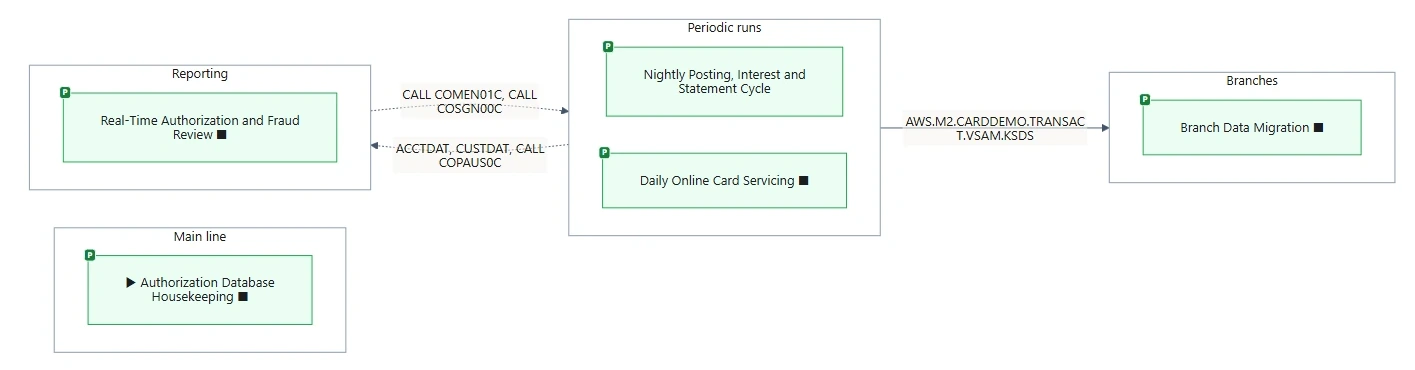
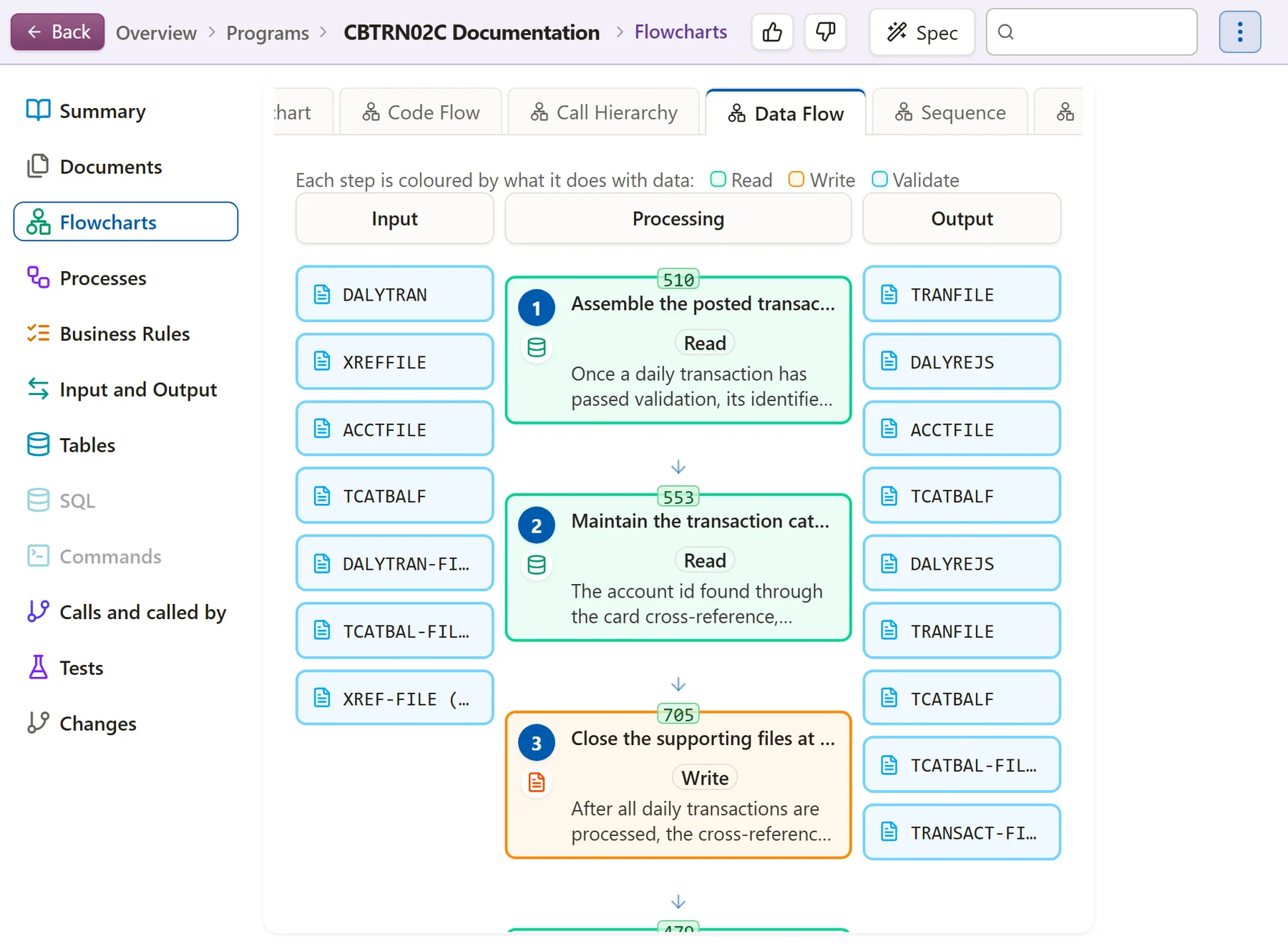
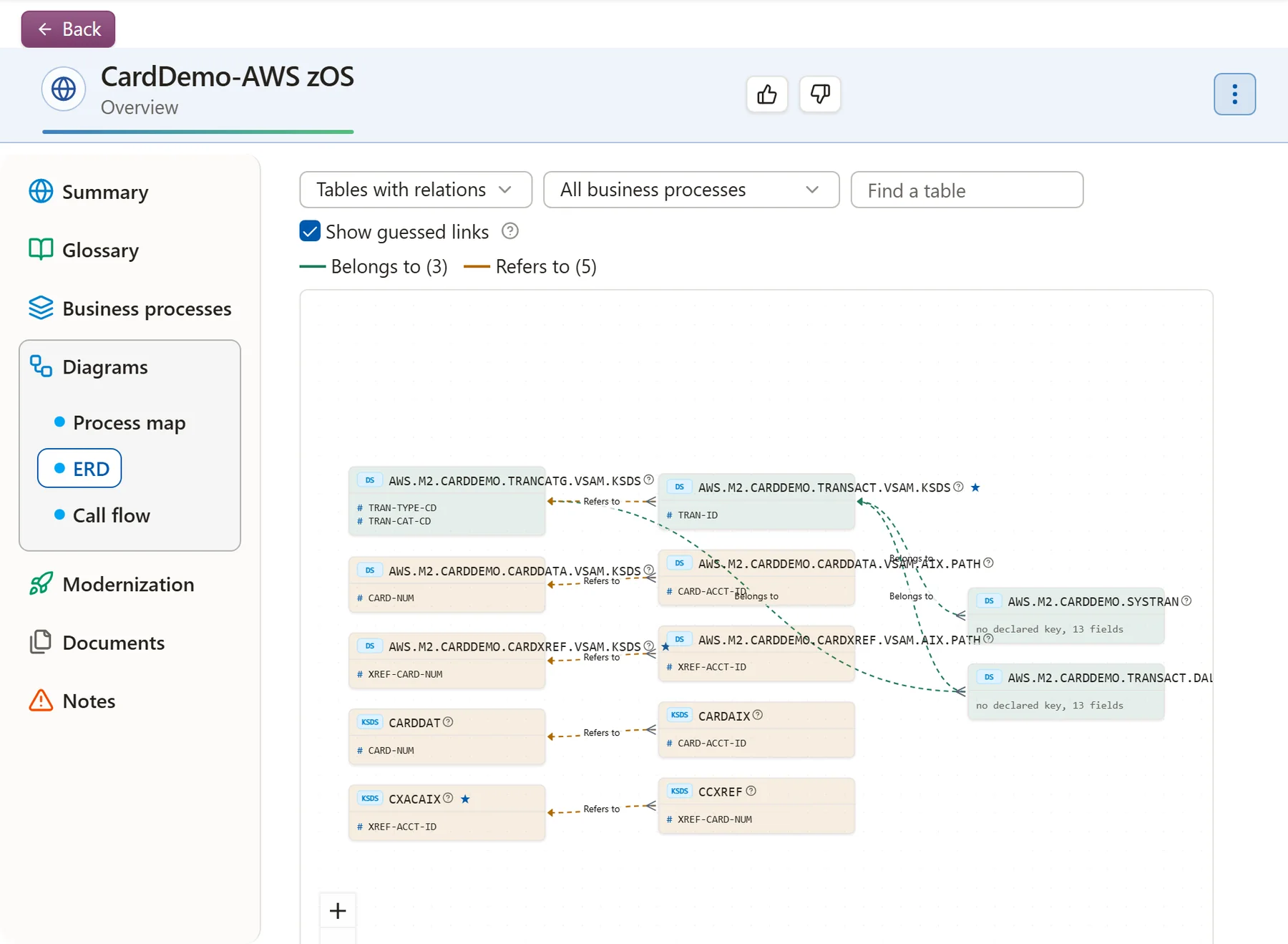
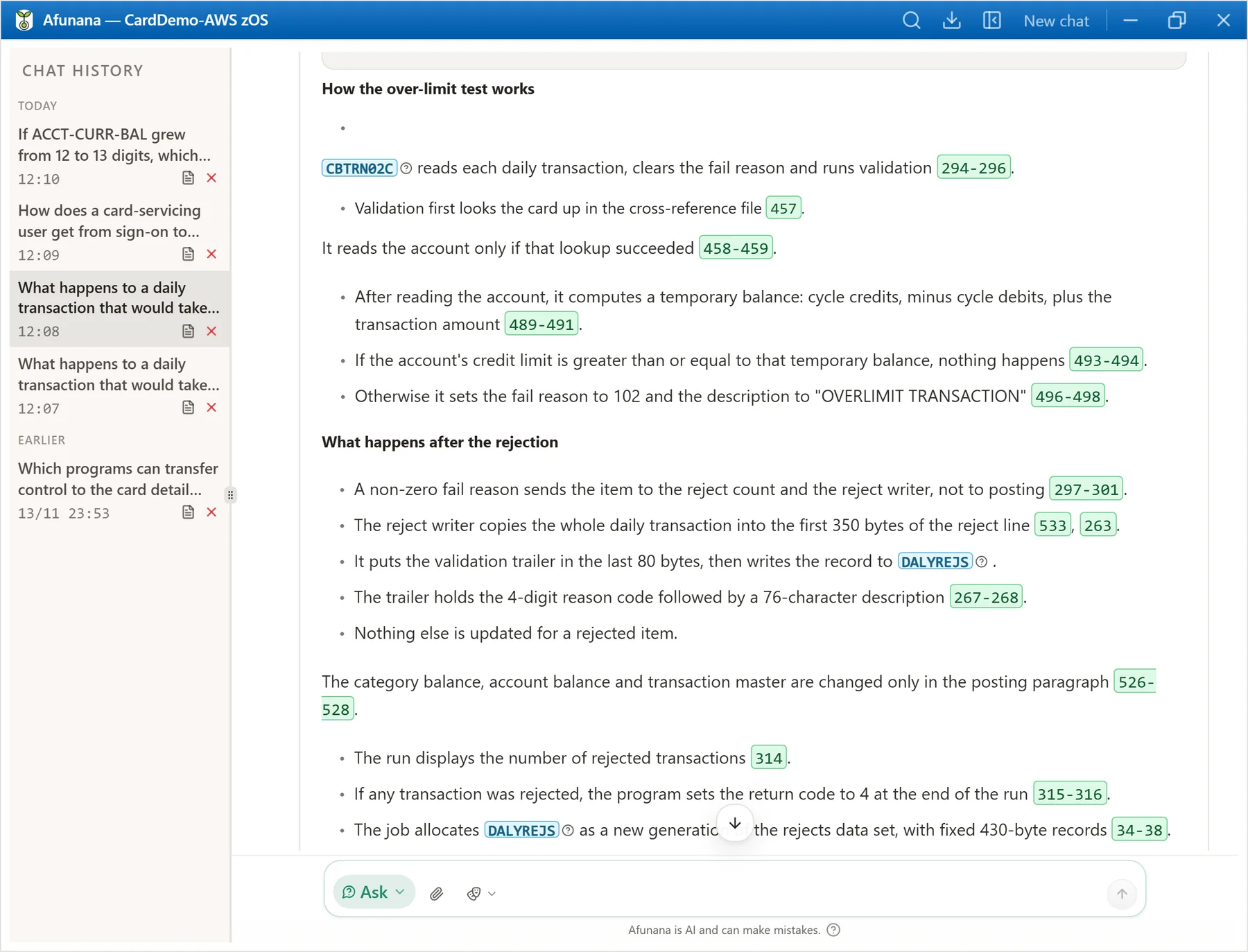
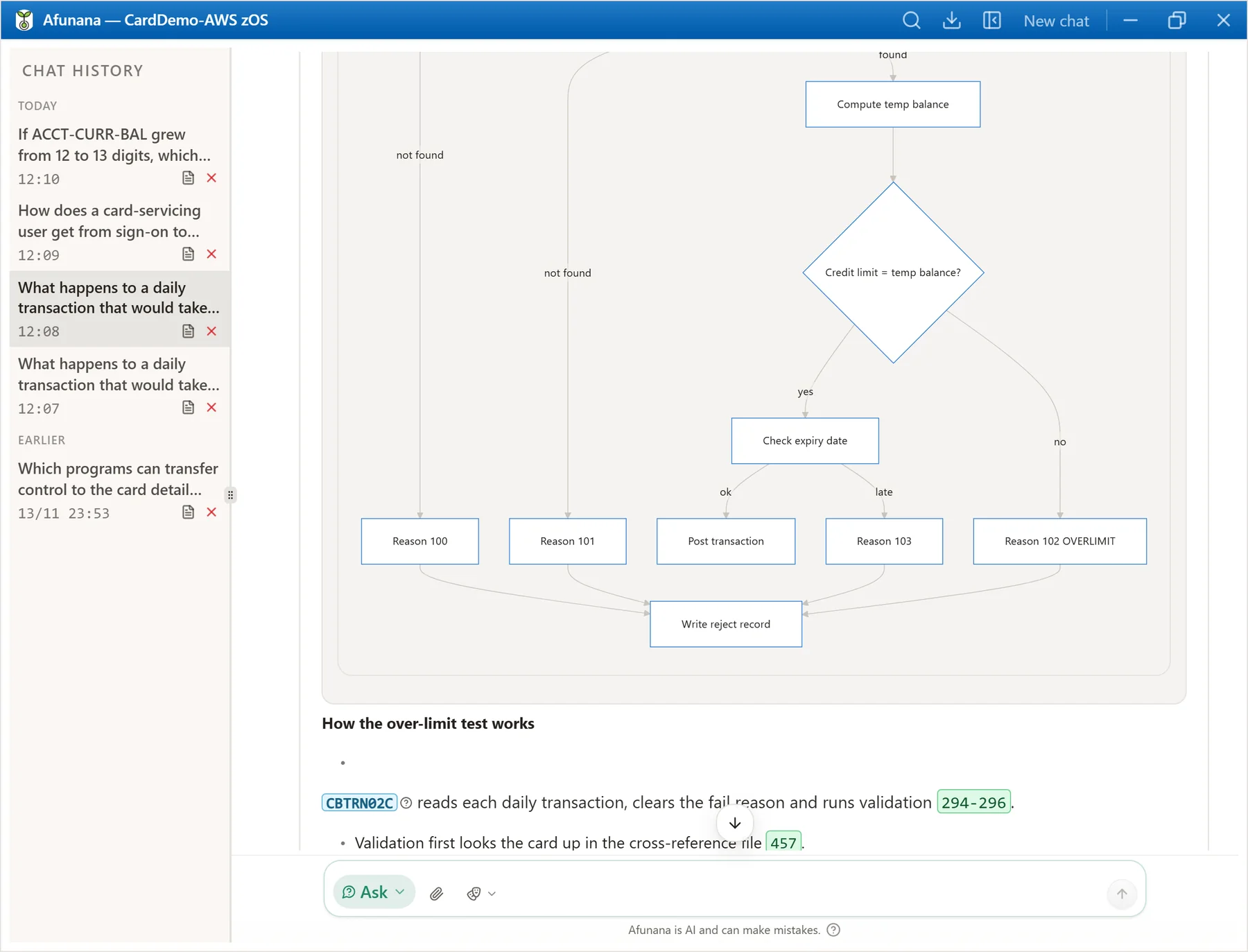
    Each sentence of a document or a chat answer shows whether it is a fact taken from the code, AI text checked against the code, or AI text not yet checked, and links to the lines of code it is based on. When a question is about the platform itself, the answer quotes the vendor's manual and names the page. Diagrams show the processes in lanes, the data flow and the tables with their relations, and every box comes from a line of code.

  • Follow the data from one application to the next

    Afunana links applications across platforms. One application's output file is mapped field by field to the next application's input: Afunana suggests the pairs from matching fields, and a person confirms them. Business processes are then chained across applications, for example a policy system on IBM i that feeds SAP and then the auditors' reconciliation.

  • Trace any field or figure to its source

    Pick a field, or a figure on a report, and Afunana follows it back through every program and job step that moves or computes it, to where it first enters the system. Each step shows its line of code. The lineage can be exported in the OpenLineage format.

  • See what each business function depends on

    For each business function, the resilience map shows the processes, programs, scheduled jobs, files and outside connections it needs. It marks the single pieces whose failure would stop the function, and the people who know that code.

  • Hand auditors an evidence pack

    An evidence pack puts the lineage, the dependencies and what changed since the last pack into one file, with a fingerprint that shows it was not altered. It answers the questions auditors ask under rules such as DORA, BCBS 239 or GDPR.

2. Develop and maintain

Change any program with the whole system behind it

Confidence: every change shows what it touches before it is made, and arrives with its proof.

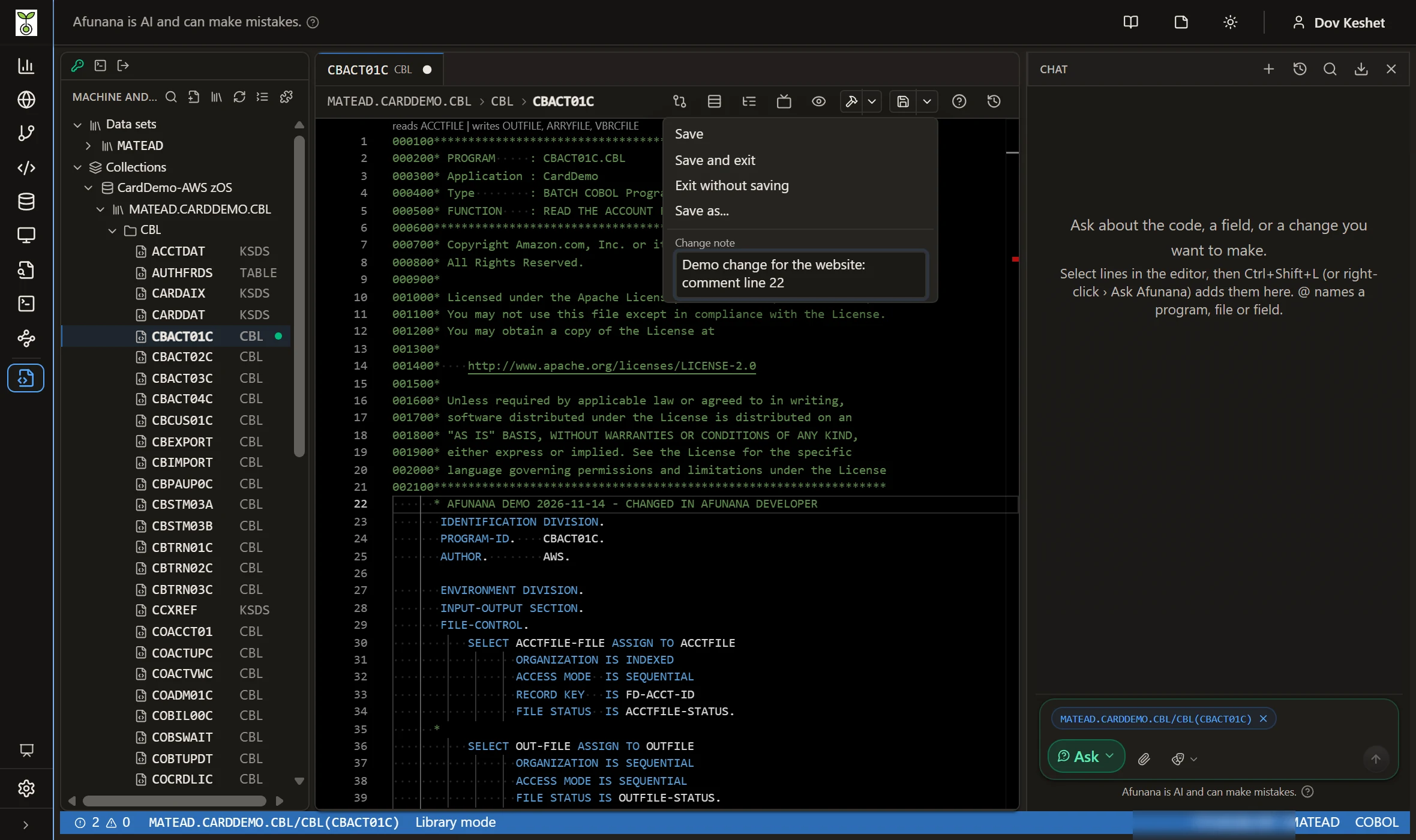
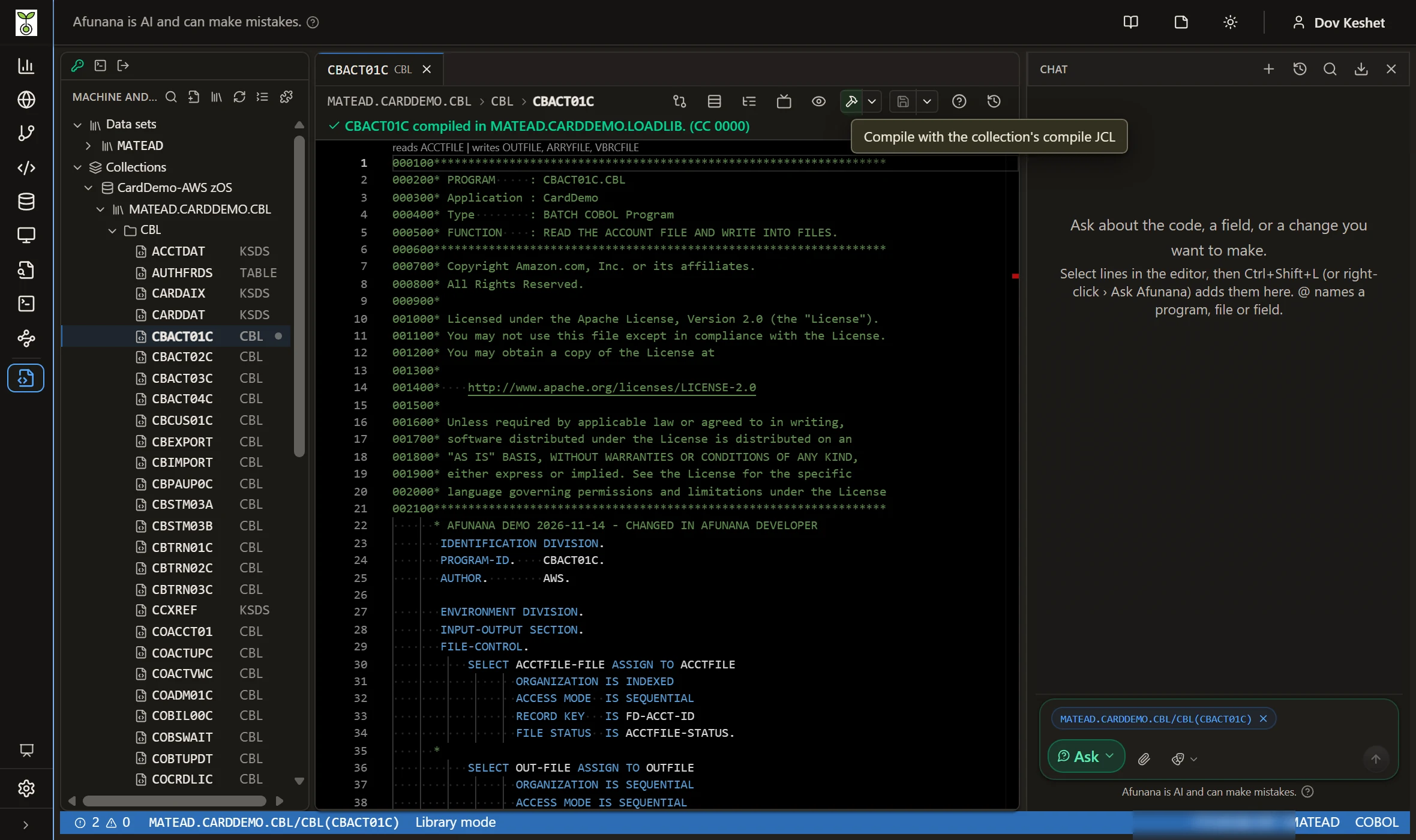
In legacy development environments, almost everything is a command: one to find a source, another to see a job's log, another to compare two sources, and a chain of screens between them. Afunana Developer keeps the tools programmers already know and puts everything they need within a few clicks of each other. Point at a field or a program and a popup says what it is and what uses it. Two versions of a program's source are compared side by side, each line shows the date it changed, and a program's history goes back day by day. It works in the browser, or in VS Code as one extension, with nothing else to find, install and set up.

  1. PickThe field or program to change.
  2. See the impactEverything the change touches.
  3. PlanChecked against the code.
  4. EditMistakes are marked as you type.
  5. Compile and testOn the real machine, with test data.
  6. ApprovedBy someone else, with its proof.
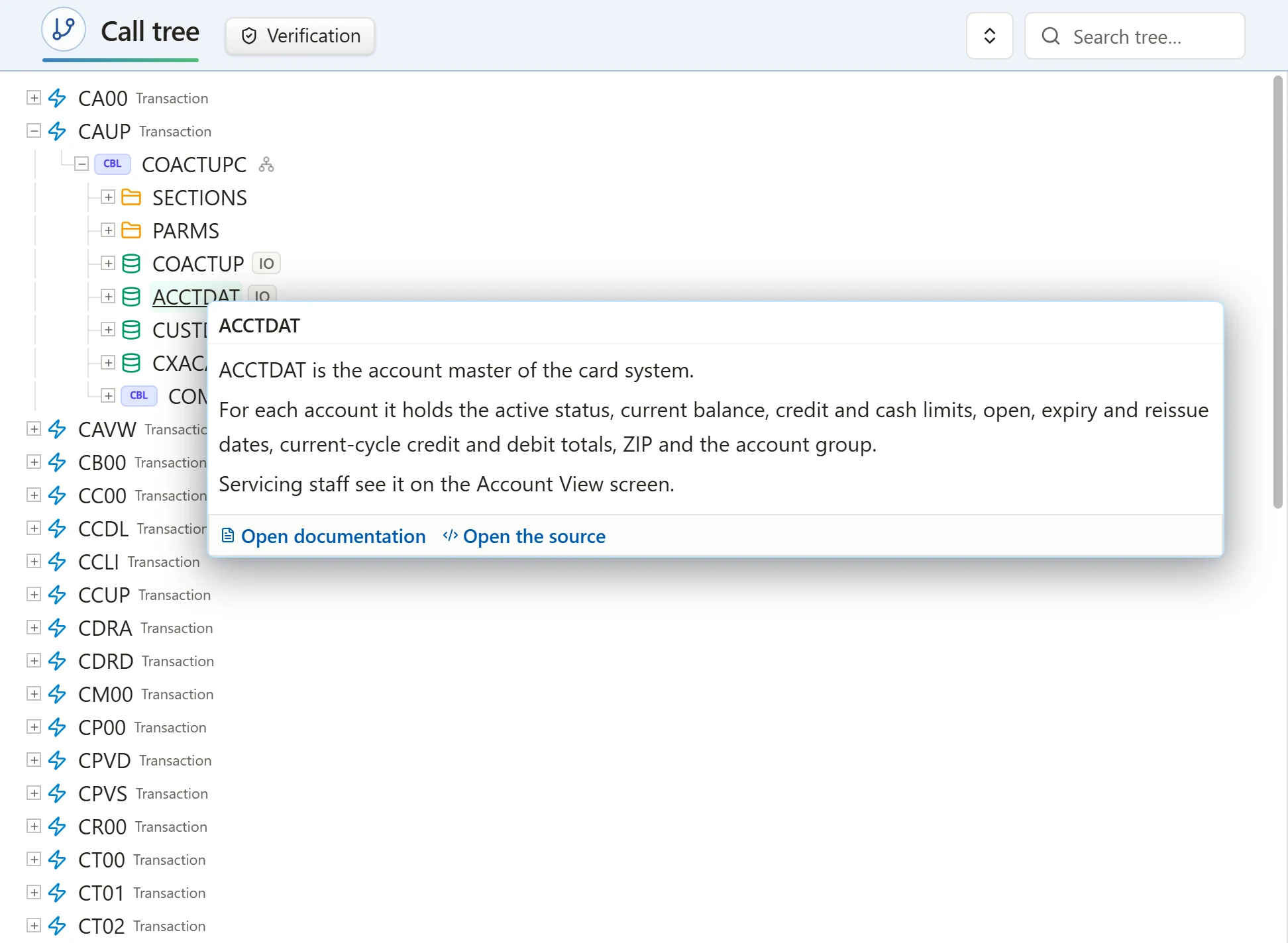
  • The whole system in one tree

    One tree beside the code holds the source files, the objects, the running jobs, the printed output, the operator messages, the commands and the database. When a job fails, the chat reads its log using the programmer's own permissions, opens the line of code that caused the error, and shows the recent changes to that program.

  • Write code with AI help

    Programmers can chat about the code they have open, get suggestions that complete the line as they type, and ask the AI to explain or change code. When the AI changes code, Afunana compiles it and fixes it until it compiles without errors. The programmer accepts or rejects each change.

  • Use skills and modes for common jobs

    Skills guide the AI through common jobs, each working from the system model: moving old code to its modern form, removing GOTOs, splitting a large program into modules, replacing native file access with SQL, turning file definitions into SQL tables, tuning database access and explaining an abend. Modes set how the AI works: a Reviewer that only comments, a Support mode that starts from the failure, and a Convert mode for moving code to a new form.

  • See what a change affects before you make it

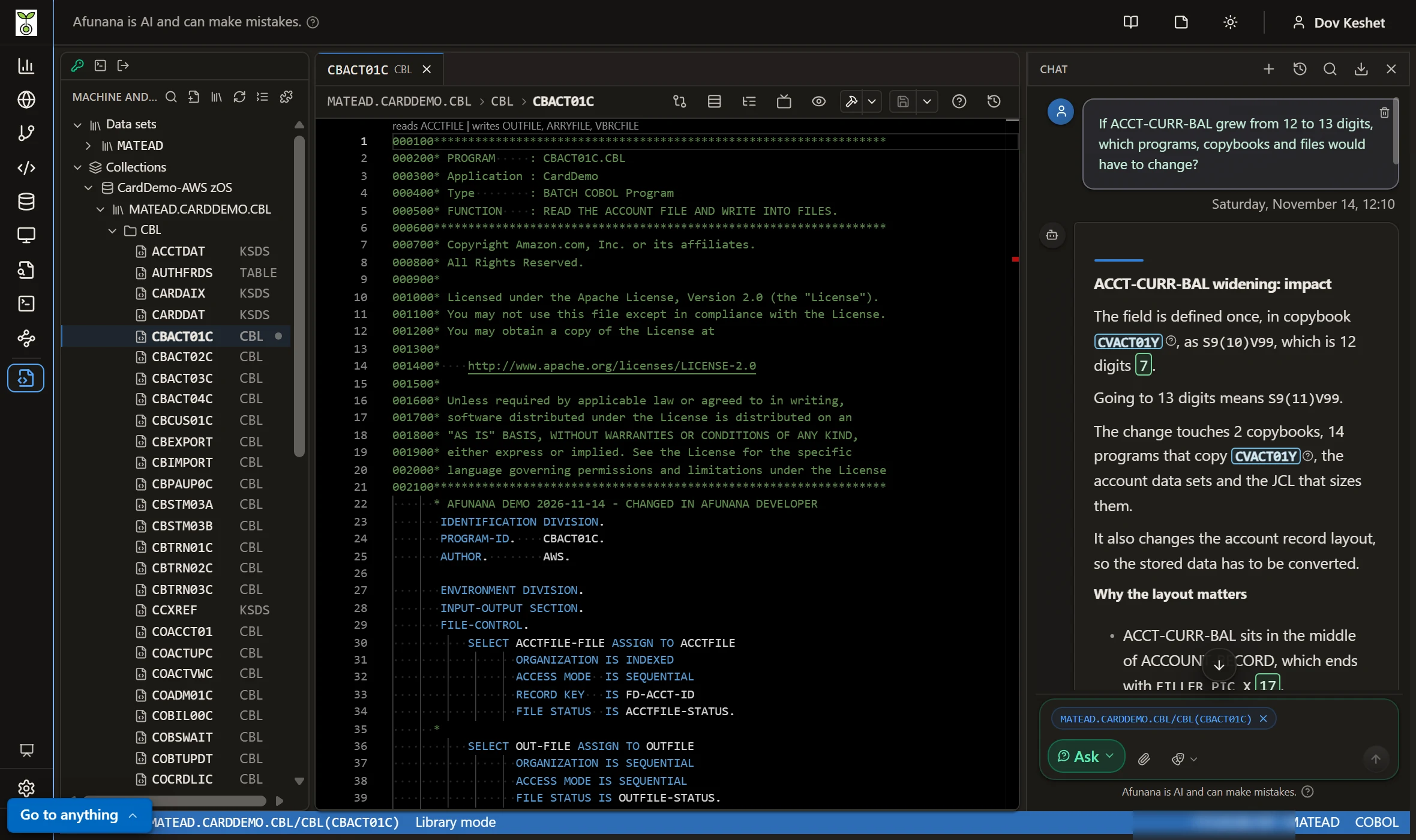
    Before a change, Afunana shows everything it would affect across the application: programs, files, SQL, queries and screens, each with the line of code that explains why. It turns this into a change plan and checks the plan against the code. For example, it flags a new child table whose records are not deleted when the parent is deleted, and a screen field that would run past the edge of the screen.

  • Compile and test on the real machine

    Each programmer edits in their own work area, under their own user, and compiles on the host itself. The compiler listing is shown, and each error appears on the line it refers to. The connection stays open between actions, so sources open quickly. Nobody approves their own change.

  • Prove each change before it goes live

    Afunana builds a smaller copy of the production data for testing, with personal details replaced and the relations between files kept whole, and writes it only to a test area you allow. Screen sessions can be recorded and replayed after a change, and the results of a batch run compared before and after. The proof is attached to the change for whoever approves it.

  • The tools programmers already know

    The familiar menu options, line commands and terminal screens are all there, so nobody has to give up how they work today. A screen layout is drawn beside its code while it is edited, and a programmer can debug their own run of a program.

  • Work in Java, JavaScript, Python and C#

    Programs in Java, JavaScript and TypeScript, Python and C# are edited in the same editor, with a backup and a history for every file. Afunana shows what an upgrade to a newer Java or framework version would break, checks every dependency against a vulnerability database kept inside your network, and finds passwords, connection strings and keys written into the code, with the value hidden.

  • Write a program again in a new language

    From the editor, a programmer can have Afunana write a program again in Java or C#, with an API for it, and check the new version against the old one on the same input.

  • Keep every change safe and recorded

    Before Afunana changes a program's source, it saves a copy in a separate backup area, and if a save fails halfway, the source is put back exactly as it was. Changes go through the change management tool you already use, such as Aldon, Turnover, Implementer, ARCAD, Endevor or ChangeMan, or through Git, where an approved change opens a pull request on GitHub, GitLab or Azure DevOps.

  • Data apps

    A data app is a ready-made screen for one table and its related tables, working on the live data: people browse, search, add, change and delete rows. A row opens its child tables with the parent's key already filled in, code fields are drop-down lists, values are checked against the table's rules before they are saved, and each change is recorded with the row before and after. Each data app is also a REST service with an OpenAPI description, so other systems can use the data before anything is rewritten.

3. Modernization

Modernize one part at a time, and prove each part

Ready for the future: move one part when you are ready, such as one business process, and prove it gives the same results while the rest keeps running.

Whatever approach you choose, the project moves one part of the application at a time: understand it, choose what to keep, rewrite or retire, generate the new code or write it yourselves, and prove it gives the same results.

  • Understand each part

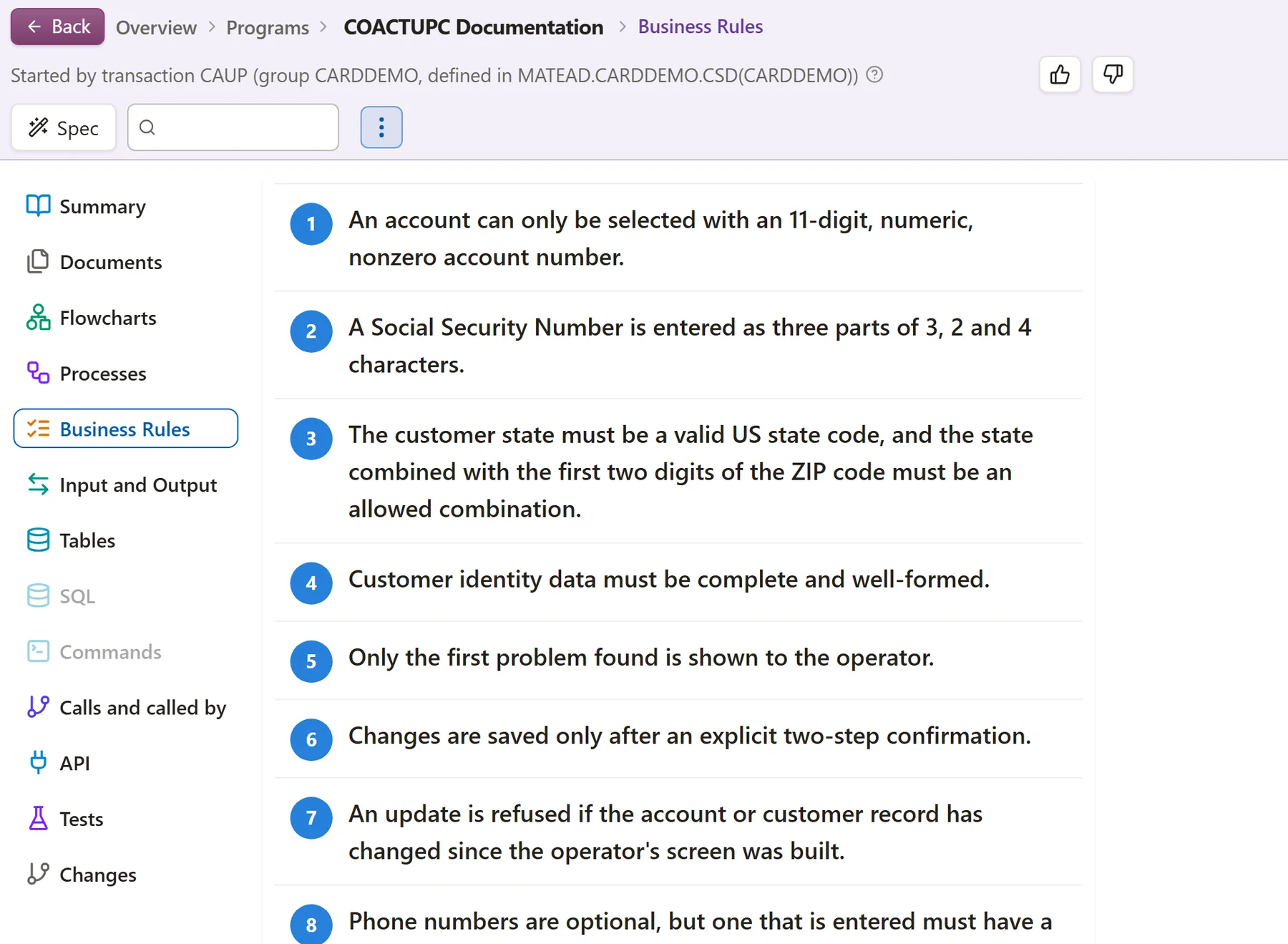
    Each program's business rules are listed in plain language with their source lines, and its logic is written out step by step. The data model gives the tables, their keys, the codes each field may hold and what they mean, and where each field's value comes from.

  • Choose what to move, and in what order

    Usage counts show which programs actually run, and which ones are never called. A top-down plan places every program, file and screen under its business process, and marks each one to keep, rewrite or retire. Each of Afunana's proposals shows what it is based on, and your people accept, change or reject it.

  • Generate the new application

    For one part or the whole application, Afunana generates the new code in Java or C#, web screens in place of the terminal screens, and REST APIs over the business functions. A project that writes the code itself works from the same rules and data model.

  • Move the data and reconcile it

    Afunana writes the tables for PostgreSQL, SQL Server, Oracle or Db2, with their keys and code tables. It copies the rows and reconciles every table: row counts, the sums of the number fields, and a fingerprint of every row.

  • Prove the new version gives the same results

    Afunana runs the old system and the new one on the same input and compares the results value by value, so differences are found before the new version is used.

Why Afunana can be trusted

How you know the answers are right

  • Specialists sign off each version

    A specialist marks the documentation of a program or a file as checked. The sign-off belongs to that version, and if the document changes later, the page shows that it changed after the sign-off. A chat answer becomes a documented business rule only after a second person approves it and every line of code it cites is confirmed to still be there.

  • Answers are checked again when the code changes

    Any chat answer can be asked again after the code changes. Afunana then compares the old and the new answer with the code, sentence by sentence, using fixed rules rather than the AI. Important answers are asked again automatically after each update.

  • A daily review of the chats

    Each day, Afunana lists the chat questions that were repeated, left unanswered, slow or failed, and your own AI model explains why each one failed. If a model does not answer, Afunana switches to another one so the person still gets an answer. If that happens again within an hour, it is reported as an incident in the daily review.

Platforms

IBM i, IBM Z, Oracle, Natural and SAP

Every platform gets the same screens, the same chat and the same audit records. Afunana also reads applications in Java, JavaScript, Python and .NET (C#), and has been tested on PowerBuilder and Delphi applications, from uploaded source.

IBM i

  • COBOL
  • RPG
  • CL
  • DDS
  • Db2 for i
  • 5250

Programs, files and fields are read from the machine itself. On the green screen, the CHAT command and PDM options ask a question, chat about a member, document or explain it, and show its impact, where it is used, a field's impact or its compile errors. Another command explains a job log. The answer comes back on the green screen or opens in the browser.

IBM Z

  • COBOL
  • PL/I
  • JCL
  • REXX
  • Assembler
  • BMS
  • CICS
  • Db2
  • VSAM
  • IMS
  • MQ
  • IDMS
  • Datacom

Batch jobs are traced from their Control-M, TWS or CA-7 schedule through each step to the data sets, and CICS transactions to the programs and files they use. PL/I, JCL, REXX, assembler and BMS open in the editor, and hovering a JCL step shows the data sets it uses. Afunana reads the mainframe through z/OSMF, IBM's standard management interface, and installs nothing on it. If you choose, a few REXX commands in a user's own data set let them ask Afunana, or explain and document a member, straight from TSO and ISPF.

Oracle

  • PL/SQL
  • SQL
  • Forms

Packages, procedures and tables are read from the data dictionary, and nothing is installed on the database. Oracle Forms are added by uploading their export.

Natural and Adabas

  • Natural
  • Adabas

The source is imported from an export, so no connection to the host is needed.

SAP ABAP and BW

  • ABAP
  • BW

The source is imported from an abapGit export, so no connection to SAP is needed.

Enterprise

On-prem, air-gapped, with your own AI

  • Installation

    One script installs Afunana in Docker or Podman and updates it to the exact version you choose, on RHEL, AlmaLinux, Rocky Linux, Ubuntu or Debian. It can use a database and a reverse proxy you manage.

  • Air-gapped

    Afunana runs with no outside connection, using AI models hosted inside your network. The documentation already written stays available even when no AI model is.

  • Access

    People sign in with a local account and an authenticator code, or through SAML or OpenID Connect. Each person sees only their own applications, in the screens and through MCP.

  • Your own AI connections and models

    Afunana uses the AI connections and models you already have. Administrators approve them after testing them on your own code, and programmers cannot change them. Each task uses only a model on that list. One switch turns every AI feature off, and names you mark as excluded, such as customer or product names, are never sent to a model.

  • Answer the AI questionnaire

    A trust pack for risk teams and auditors, generated from the running system: what AI Afunana uses and for what, where each request goes, and which model providers are configured and actually called.

  • A record of who did what

    Each request to a model is recorded with who asked, about what, with which model and at what cost. Each saved version of a program keeps who changed each line. Requests, approvals and reported problems can be forwarded to your security monitoring (SIEM).

  • Passwords and keys stay in your own vault

    Model keys and connection passwords can stay in your own secrets vault. Afunana reads them from there when it needs them.

Your AI tools, connected through MCP

Afunana runs an MCP server as part of every installation, on-prem. Any MCP client connects to its address, the person signs in once in the browser (OAuth 2.0), and every request then runs with that person's own access. The server is read only. It returns documentation, metadata, source lines and the data map, and a question about the data comes back with the SQL that answered it.

On its own, or with what you have

On its own, or with the tools you already use

Afunana covers the whole job by itself, and it works with whatever you already use. You choose.

  • On its own

    Everything a team needs, in one place: documentation and chat, AI help to write and change code, the editor and compile on the machine itself, impact and change plans, and modernization one part at a time.

  • With your AI assistant

    GitHub Copilot, IBM Bob, Claude Code, Cursor or any MCP client connects to Afunana and works from the same model, with the source lines behind each answer.

  • With your modernization partner

    Each part starts with its rules, its data model and the programs that actually run, and ends with proof that the new version gives the same results, whoever writes the new code.

  • With your change management

    Aldon, Turnover, Implementer, ARCAD, Endevor, ChangeMan or Git: every change reaches it with its impact, its plan and its proof.

  • Where people already work

    The green screen, ISPF, the browser and VS Code: answers come to the screens programmers use today.

  • With your data tools

    The data map in business terms, and field lineage in the OpenLineage format, for the data and governance tools you already run.

Product names are trademarks of their owners.

A public benchmark

Tested in public on AWS CardDemo

AWS CardDemo is a public credit card application for the mainframe. We loaded it onto our own mainframe, and Afunana read it as it would read a customer's system. The table is in this order: complete, true, run on the machine, usable, current, and cost.

MeasureAfunana
Complete
Source read50,405 lines in 191 members, read from the mainframe
Programs compiled by the real compiler44 of 44 COBOL programs compiled on the mainframe, listings read
Data layouts13,003 data items, each with its byte length and offset, the same on every run
Calls between programs261 calls, of which 61 go through a variable; 7 (a return to whichever program called, known only at run time) left unresolved
Programs and jobs linked to data sets92 program to data set and 238 job to data set links
Programs nothing reaches (dead code)1 of 44 (CBTRN01C), counted after every route is followed: menus, CICS transactions and jobs
True
Invented content5,044 of 5,125 (98.4%) of the names in the documents found in the code; 2,419 of 2,419 of the line citations located
Documentation scoreLegacyCodeBench, 200 COBOL programs: 92.9, scored with the benchmark's own evaluator, no critical failures B3
Behavior answered from the documents0.961 of 875 behavior questions written by the AWS AI Labs method on 15 programs (0.964 averaged per program) B4
Business rules525 rules; not yet measured whether they are the same on a second run
Run on the machine
Batch jobs run on the real mainframe, outputs compared14 jobs run; 26 of 26 outputs identical on a second run
Usable
Questions answered38 questions: 96.5% of the expected facts found, and none wrong (every flagged sentence was checked against the source)
Coverage of a large programOn two large public COBOL programs: 100% of the paragraphs (188 of 188, and 939 of 939 in an 18,835-line program)
Current
A change on the machine picked upContinuously: the members changed on the mainframe are found, and only those are read and documented again.
Cost
AI cost of reading the whole application$46.17 for the whole application (105 programs and jobs)
AI cost of one answer$0.31 a question

Time is listed last because it matters least: Afunana took 37 minutes, including compiling every program on the mainframe.

  • 57 of 58 rules in the documents confirmed by running the real programs on z/OS. How
  • 841 of 875 behavior questions agree with the code; the 34 that don't, explained. See them
  • 189 of 200 LegacyCodeBench programs pass; the other 11, and why. See them
Benchmark sources
  1. B3. LegacyCodeBench: evaluator and per-task results, v3, January 2026; its leaderboard page shows the earlier v2.3.1 scores
  2. B4. AWS AI Labs, Fidelity Probes

The CardDemo source is published by AWS under the Apache 2.0 license.

About Afunana

The people behind Afunana

Dov Keshet

Dov Keshet

Co-founder, Legacy Systems Architecture

Dov has four decades of hands-on experience with COBOL and enterprise applications. He has designed core systems and led development groups. At Afunana he leads the product and its architecture, from reading the source on legacy systems to planning, checking and writing changes back.

Batel Mirel

Batel Mirel

Co-founder, AI and Solutions

Batel spent fifteen years as a COBOL programmer on insurers' core systems. She designed and built the part of Afunana that turns code into documentation and answers. In her design, everything that can be known for certain is computed from the code, and the AI writes from those facts.

Jonathan Clayman

Jonathan (Yoni) Clayman

Chief Business Officer

Jonathan has worked in sales and partnerships for enterprise software and AI companies for more than 20 years, selling both directly and through systems integrators. At Afunana he leads work with enterprise customers and partners.

Partners

For systems integrators and their clients

Systems integrators use Afunana in their client projects. During the discovery phase, Afunana traces each business process through the code and the data. At handover, the client keeps the documentation and the answers.

Partnerships: Jonathan Clayman, Chief Business Officer, for integrators, resellers and global partners: jonathan@afunana.io.

FAQ

Questions we get

Do we need another AI assistant?

No. Afunana has its own AI help for programmers, and if you already have an assistant, it connects to Afunana over MCP and works from the same model. Use either, or both.

Does our source leave our site?

No. The source, the documentation and the search index stay in your installation, and with a model hosted inside your network nothing leaves it.

Does the AI model see the comments in our code?

When source is sent to the model, every comment is blanked out, and each line keeps its number so the citations stay correct. When writing the documentation, Afunana reads a comment only where a name in the code is unclear, and it follows the code where the two disagree.

Where does Afunana write?

Source is saved only in the programmer's own work area, and test data only in a test area you allow. Data apps change live rows only for the people you allow, and every change is recorded with the row before and after.

Can it run on a Windows server?

Afunana runs on Linux. On a Windows server, it runs in a Linux virtual machine on Hyper-V or VMware.

Which AI models does it use?

Any model your organization approves from Anthropic, OpenAI or Amazon Bedrock, or a model hosted inside your network.

What do we need to start?

A server for Afunana, and either a connection to the host with a user you choose or an export of the source. The first application starts from a program you name, and Afunana finds the rest of it by following the code.

Can we add our existing documents, such as Confluence pages?

Yes. They are added to the application as supporting material, and only the parts that mention a program or a file are sent to the AI. Where a document and the code disagree, the code is taken as correct, and a report lists every such place.

Request a demo

Tell us what you need

Tell us which application you would like to look at. A first project usually covers one well-defined part of it, with questions your own specialists can judge, so both sides agree in advance how the results will be checked.

Afunana169 Madison Ave. #2172New York, NY 10016United StatesPhone: +1 888 890 2534